
AI video effectNEW
Snow Globe Video Generator: Put Your Photo Inside a Snow Globe
Upload a photo and place it inside a glass snow globe: snow swirls, lights glow and a music-box melody plays. A 10-second vertical clip for cards, posts and stories.
Type a prompt or upload a photo. We'll take it to the studio.
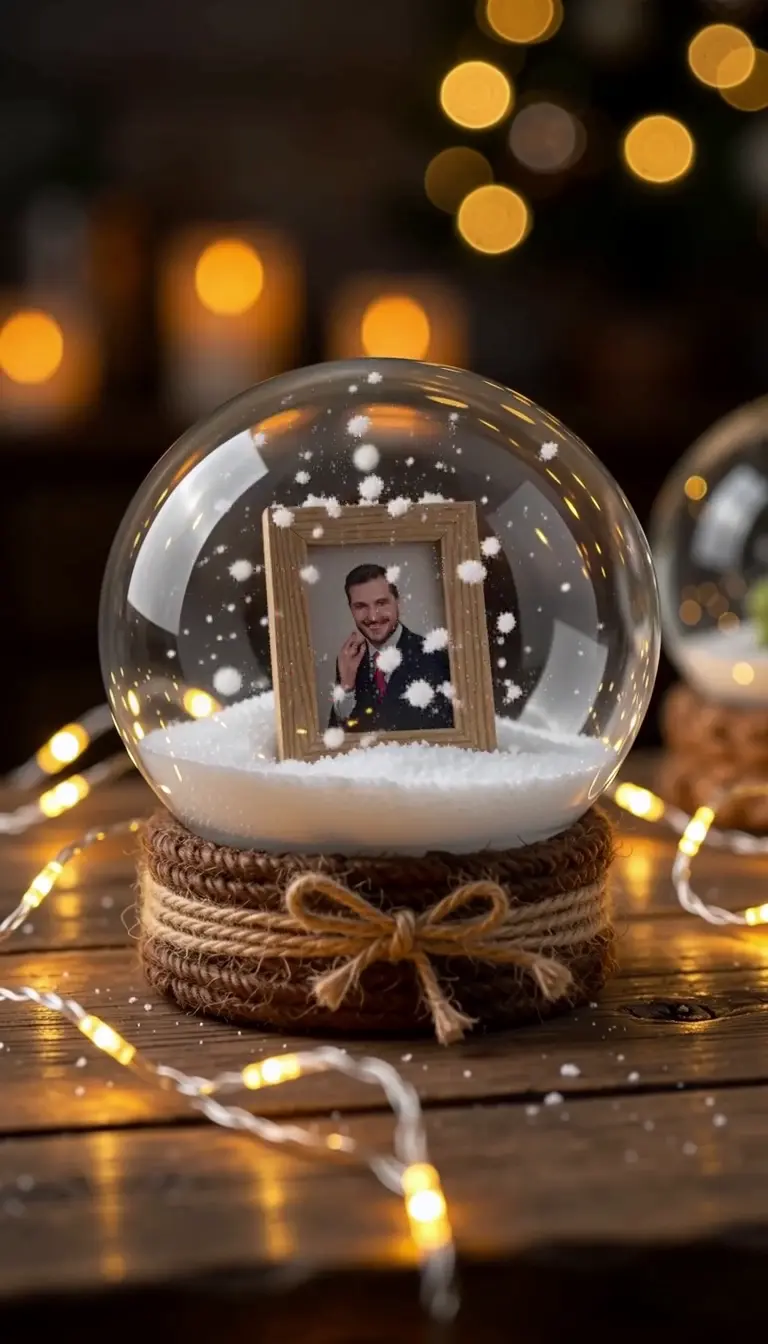
Cozy snow globe video: the photo sits inside a glass snow globe on a wooden table, snow swirling around it, warm lights glowing, slow push-in, gentle music-box melody, vertical video.
- You bring
- A photo, or a description in words
- You get
- A clip with sound, 3–30 seconds depending on the model
- Runs on
- 10 video models, MiniMax H3 by default
- Price
- From 3 credits a clip, shown before you send
Try Snow Globe Video Generator now
Start from a ready-made prompt and see the price before you send. You sign in before your first render.
Why use this Snow Globe Video Generator
Snow globe video from your own photo
Your subject sits inside the globe instead of a generic scene. Upload a favourite photo and the clip starts from it.
A snow globe with sound
Ask for a music-box melody in your prompt. The models with sound generate a simple tune with the clip, while the snow keeps falling.
A 10-second vertical snow globe for cards and stories
Made for 9:16: a short, loopable clip that fits stories, Reels and a video card without cropping.
What you can make with Snow Globe Video Generator
Animated Christmas cards
A moving card instead of a still picture: your photo inside a snow globe, sent to family or friends.
Holiday posts and stories
A festive vertical clip for December social posts, with snow, lights and music in one shot.
Keepsake clips from a favourite photo
Turn a memory — a portrait, a pet, a place — into a snow globe you can share every Christmas.
How to make a snow globe video
Step 1
Add your photo
Use a clear photo with one main subject — a person, a pet, a place or a product — so it reads well inside the globe. Bright subjects on simple backgrounds work best.
Step 2
Edit the starter prompt
The prompt box starts with a ready-made Snow Globe prompt. Change the subject, setting or mood in plain words; the agent turns it into a detailed prompt.
Step 3
Pick model, length and resolution
Choose a video model, a length and a resolution in the composer. The credit price updates before you send.
Step 4
Generate, refine and download
Send it (you will be asked to sign in first if you are not). Ask for changes in the same chat, such as a different mood or pacing, then download the version you like.
Try Snow Globe Video Generator now
Before a first plan or credit pack, clips render at the model's lowest resolution and up to 5 seconds; buying either unlocks every resolution and length.
Snow Globe Video Generator: limitations and tips
Small details in the photo can blur inside the globe. Use a clear, high-contrast picture for the best result.
The globe, snow and music are generated: the snow may fall unevenly and the melody is a simple music-box tune, not a recorded song.
Some models refuse realistic photos of people as the opening frame. If a photo is refused, describe the scene in words or pick another model.
Each render is a single clip of 3 to 30 seconds, depending on the model (Muse is always 10 seconds).
Photos go in as frames, not as character references: the first photo is the opening frame, and on MiniMax H3, MiniMax H3 Max, Seedance 2.5, Seedance 2.0, Seedance 2.0 Fast, Seedance 2.0 Mini, and Kling V4 a second photo sets the closing frame. Kling V4 Flash, Gemini Omni 1.2 Flash, and Muse take one photo.
Hands, fast motion and on-screen text are where current video models slip most often. A simpler action or a second try usually helps.
Snow Globe Video Generator: frequently asked questions
What is Snow Globe?
The Snow Globe effect is a video effect that places your photo inside a glass snow globe and animates it as a short clip with falling snow and music.
How do I make a snow globe video?
Open Snow Globe on AI Trend Studio, upload a photo or describe the scene in the prompt box and send it. An AI agent writes a detailed prompt from yours and renders a 3–30 second video clip, usually within a few minutes; ask for changes in the same chat and download the version you like.
How do I put my photo inside a snow globe video?
Upload a clear photo with one main subject and send the snow globe prompt. The photo sits inside a glass globe while snow swirls around it; bright subjects on simple backgrounds read best.
Does the snow globe video have music?
Ask for a music-box melody in your prompt. The models with sound generate a simple tune with the clip; other models render the same scene without audio.
Does the snow globe video have sound?
Ask for a music-box melody in your prompt. The models with sound generate a simple melody with the clip; other models render the same scene without audio. Pick a model with sound in the composer if music matters.
Can I put a product photo in a snow globe?
Yes. Upload a clear product photo and describe the globe around it. It works well for festive product posts, though small labels and text on the product may blur.
Do I need to upload a photo for Snow Globe?
A photo gives the best result: Snow Globe uses it so your subject stays recognisable. You can also describe the scene in words and let AI Trend Studio generate it.
How much does Snow Globe cost?
A Snow Globe clip costs from 3 credits, typically 10 credits for a 5-second MiniMax H3 clip at 768P. Plans start at $19.90 a month for 200 credits and credit packs at $19.90 for 120 credits; the exact price shows before you send, and failed renders are refunded.
Which AI models does Snow Globe use?
Snow Globe on AI Trend Studio runs on MiniMax H3, MiniMax H3 Max, Seedance 2.5, Seedance 2.0, Seedance 2.0 Fast, Seedance 2.0 Mini, Kling V4, Kling V4 Flash, Gemini Omni 1.2 Flash, and Muse. Keep the default or pick a model per request; the composer shows each one's price before you send.
Related tools and effects
- AI Christmas VideoNEWMake an AI Christmas video
- AI Christmas PhotoNEWMake an AI Christmas photo
- Image to Video AITurn an image into a video with AI
- AI Muscle EffectHOTMake an AI muscle video
- AI Dance Video GeneratorHOTMake a photo dance with AI
- Cheek Pinch AI EffectNEWMake a cheek pinch video
- Flash Fashion AIHOTMake an outfit-change video
- AI Action Figure GeneratorHOTTurn a photo into an action figure
Ready to try Snow Globe Video Generator?
The starter prompt is already in the box at the top of this page. Edit it, check the price and send.
- Price shown before you send
- Failed renders are refunded
- Refine the result in chat