
AI video model
Seedance 2.0 AI Video Generator
Seedance 2.0 is the full-size Seedance 2.0 model from ByteDance. It renders 4 to 15 second clips at 480p, 720p or 1080p and generates a soundtrack with the picture.
Type a prompt or upload a photo. We'll take it to the studio.
Real Seedance 2.0 cases with prompts
Each case was made in AI Trend Studio with the prompt shown. Use a prompt as your starting point: results vary from one render to the next.
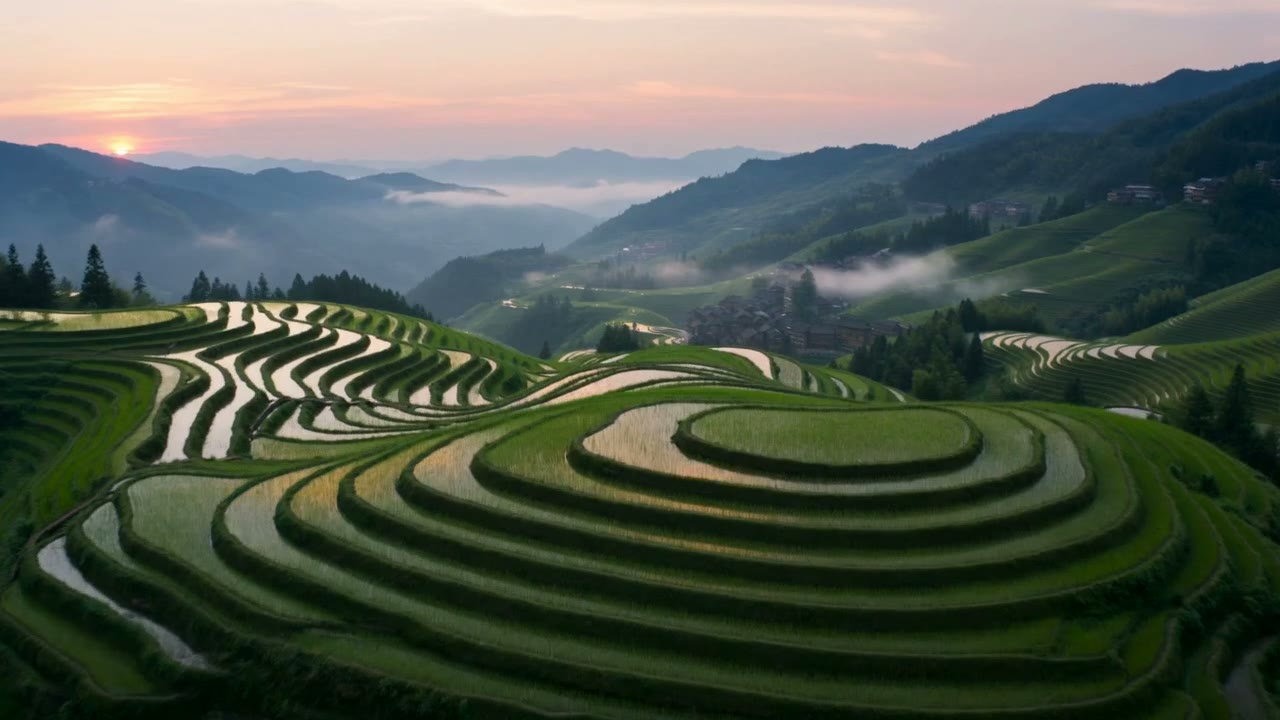
Result Drone shot over rice terraces at sunrise (Seedance 2.0)
Prompt
Cinematic drone shot gliding forward over green terraced rice fields at sunrise, low mist drifting between the hills, water in the terraces reflecting the pink sky, a small village with wooden houses in the distance.
Try Seedance 2.0 now
Start from a ready-made prompt and see the price before you send. You sign in before your first render.
Seedance 2.0 at a glance
- Type
- Text to video, image to video
- Length
- 4–15 seconds
- Resolution
- 480p, 720p, 1080p
- Input images
- Up to 2 (first and last frame)
- Audio
- Generated with the clip
- Price
- 480p: 12 credits per 5 s · 720p: 24 credits per 5 s · 1080p: 57 credits per 5 s
Prices are in credits and match what the composer charges. Failed or stopped renders are refunded.
Why use Seedance 2.0
Seedance 2.0 at up to 1080p
The standard Seedance 2.0 renders 1080p, which the Fast and Mini versions do not. Use 480p or 720p when you are still trying ideas.
Video with generated audio
Ambience, footsteps and music are rendered with the clip instead of being added afterwards.
First and last frame control
Attach one photo as the opening frame, or two to set where the clip starts and ends.
How to make a video with Seedance 2.0
Step 1
Add a photo or describe the scene
Upload a photo with the upload button, or skip it and describe the scene in words.
Step 2
Edit the starter prompt
The prompt box starts with a ready-made Seedance 2.0 prompt. Change the subject, setting or mood in plain words; the agent turns it into a detailed prompt.
Step 3
Pick model, length and resolution
Seedance 2.0 is preselected; choose a length and a resolution in the composer. The credit price updates before you send.
Step 4
Generate, refine and download
Send it (you will be asked to sign in first if you are not). Ask for changes in the same chat, such as a different mood or pacing, then download the version you like.
Try Seedance 2.0 now
Before a first plan or credit pack, clips render at the model's lowest resolution and up to 5 seconds; buying either unlocks every resolution and length.
Seedance 2.0: limitations and tips
Each render is a single clip of 3 to 30 seconds, depending on the model (Muse is always 10 seconds).
Photos go in as frames, not as character references: the first photo is the opening frame, and on MiniMax H3, MiniMax H3 Max, Seedance 2.5, Seedance 2.0, Seedance 2.0 Fast, Seedance 2.0 Mini, and Kling V4 a second photo sets the closing frame. Kling V4 Flash, Gemini Omni 1.2 Flash, and Muse take one photo.
Hands, fast motion and on-screen text are where current video models slip most often. A simpler action or a second try usually helps.
Seedance 2.0: frequently asked questions
What is Seedance 2.0?
Seedance 2.0 is a video generation model from ByteDance. In AI Trend Studio it makes 4 to 15 second clips at up to 1080p, with generated audio, from text or images.
How do I make a video with Seedance 2.0?
Open Seedance 2.0 on AI Trend Studio, upload a photo or describe the scene in the prompt box and send it. An AI agent writes a detailed prompt from yours and renders a 4–15 second video clip, usually within a few minutes; ask for changes in the same chat and download the version you like.
Seedance 2.0, Fast or Mini: which should I pick?
All three make 4 to 15 second clips with audio. Seedance 2.0 adds 1080p; Fast and Mini stop at 720p and cost less, Mini the least.
Do I need to upload a photo for Seedance 2.0?
No, a photo is optional. Upload one to keep a specific subject, or describe the scene in words and AI Trend Studio generates it from the text.
How much does Seedance 2.0 cost?
Seedance 2.0 on AI Trend Studio costs 480p: 12 credits per 5 s, 720p: 24 credits per 5 s, 1080p: 57 credits per 5 s, paid in credits from a plan or a credit pack. The exact price shows before you send, and failed or stopped renders are refunded. Before a first plan or credit pack, clips render at the model's lowest resolution and up to 5 seconds; buying either unlocks every resolution and length.
Related tools and effects
- Seedance 2.0 FastMake a video with Seedance 2.0 Fast
- Seedance 2.0 MiniMake a video with Seedance 2.0 Mini
- Seedance 2.5Make a video with Seedance 2.5
- Photo to Video AITurn a photo into a video
- MiniMax H3Make a video with MiniMax H3
- MiniMax H3 MaxMake a video with MiniMax H3 Max
- Kling V4Make a video with Kling V4
- Kling V4 FlashMake a video with Kling V4 Flash
Ready to try Seedance 2.0?
Open the studio with a starter prompt, edit it and generate.
- Price shown before you send
- Failed renders are refunded
- Refine the result in chat